JavaScript Array and its Methods

Why do we need an array in javaScript
Let’s consider the situation where we need to store 50 numbers or need to store the name of 50 students. If we use simple variable or data type concept then we need 50 variables to store the data. something like below.
let num1;
let num2;
let num3;
.
.
let num50;
To handle such situations, almost all the programming languages provide a concept called array.
Array
JavaScript array is a single variable or object that is used to store multiple values.
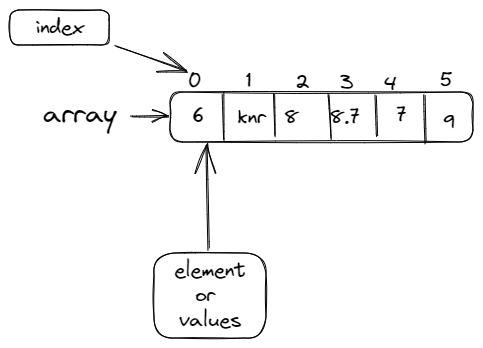
How to create array in javaScript
We can create array in javascript using square bracket ( [ ] )
Syntax :-
data_type arrayName = [value1, value2, value3 ...];
Example :-
let myArr = ["krishna","ray", 10, 5.6];
console.log(myArr)

o/p - ['krishna', 'ray', 10, 5.6]
Characteristics of javaScript array
It can hold values of mixed types. For example, you can have an array that stores elements with the types number, string, boolean, and null.
The size of an array is dynamic and auto-growing. In other words, you don’t need to specify the array size.
arrays are Zero-indexed means the first element of an array is at index
0, the second is at index1, the third is at index 2 and so on — and the last element is at the value of the array'slengthproperty minus1.
Accessing and modifying the array
You can access individual items in the array using bracket notation and supplying the item's index in that bracket.
Example :-
let myArr = ["krishna","nand","ray",1000,9.0,true];
console.log(myArr[0]);
console.log(myArr[1]);
console.log(myArr[2]);
console.log(myArr[3]);

OUTPUT:-
krishna
nand
ray
1000
Modifying the array
you can modify array using index number.
Example:-
let myArr = ["krishna","nand","ray",1000,9.0,true];
myArr[0] = 1;
myArr[2] = "mukund";
console.log(myArr[0]);
console.log(myArr[2]);
console.log(myArr[3]);

OUTPUT:-
1
mukund
ray
1000
How to find length of array
We can find length of array using built-in length property.
Example :-
let myArr = ["krishna","nand","ray",1000,9.0,true];
console.log(myArr.length);

OUTPUT:-
6
Methods in array
concat()
The concat( ) method is used to merge two arrays or more than two arrays. This method does not change the existing arrays. After concat it returns a new array.
Example:-
let arr1 = ['krishna', 'ray', 'nand'];
let arr2 = [1, 2, 3];
let arr3 = arr1.concat(arr2);
console.log(arr3)

OUTPUT:-
[ 'krishna', 'ray', 'nand', 1, 2, 3 ]
indexOf()
The indexOf() method return the index of a given element, if multiple element is present then it return indexOf first element. if the given element is not present in array then it return -1.
Syntax :-
Array.indexOf(search_Element)
Example :-
let myArr = [10,20,20,30,40,50,"krishna","krishna"]
console.log(myArr.indexOf(40));
console.log(myArr.indexOf(20));
console.log(myArr.indexOf("krish"));

OUTPUT:-
4
1   // returns the first occurance of element(20)_
-1 //here element is not present so it retuirn -1
We can also provide index/position from where we want to search/check for index
Syntax:-
Array.indexOf(searchElement, fromIndex)
lastIndexOf()
The lastIndexOf() method returns the last index of the given element. If the element is not present in array then it return -1.
If we pass -(negative) index then it count/search from last index i.e array.length-1.
Syntax:-
lastIndexOf(array_eleemt)
lastIndexOf(array_eleemt, fromIndex)
fromIndex :- it start searching from backwards direction from the fromIndex.
Example: -
let numbers = [10,50,90,20,20,30,100];
console.log(numbers.lastIndexOf(20));
console.log(numbers.lastIndexOf(90));
console.log(numbers.lastIndexOf(30,2));
console.log(numbers.lastIndexOf(10,-1));
console.log(numbers.lastIndexOf(5));

OUTPUT:-
4
2
-1 ///here -1 ibeacuse 30 in not found in backward direction from index 2
0  //here search start from last
-1
push()
The push() method is used adds one or more elements in the given array. it add elements at the end the array , after add it rerun a new length array.
Syntax: -
Array.push(ele1);
Array.push(ele1,ele2,eel3,.....);
Example:-
let list_of_eleemnt = [10,50,90,100];
 console.log("original array:- ", list_of_eleemnt)
 list_of_eleemnt.push(60)
 list_of_eleemnt.push("krishna")
 list_of_eleemnt.push('a')
 list_of_eleemnt.push(10.10)
 console.log("After push operation new array is :- ")
 console.log(list_of_eleemnt)

OUTPUT:-

original array:-  [ 10, 50, 90, 100 ]

After push operation new array is :-
[ 10, 50, 90, 100, 60, 'krishna', 'a', 10.1 ]
pop()
The pop() method removes the last element from an array and returns that element. This method changes(reduce) the length of the array.
Syntax:-
Array.pop()
Example:-
let arr = [ 10, 50, 90, 100, 60, 'krishna', 'a', 10.1 ];
arr.pop();
console.log(arr)

let poped_element = arr.pop()
console.log(poped_element);

OUTPUT:-
[ 10, 50, 90, 100, 60, 'krishna', 'a' ]
a
reverse()
The reverse() method is used to reverse the elemnt of an array.
Syntax:-
array.reverse()
Example:-
let arr1 = [1,2,3,4,5];
console.log(arr1.reverse());

let arr2 = ["Krishna","is","Name","My"];
console.log(arr2.reverse());

OUTPUT:-
[ 5, 4, 3, 2, 1 ]
[ 'My', 'Name', 'is', 'Krishna' ]
shift()
The shift() method removes the first element from an array(at the zeroth index) and shifts the values at consecutive indexes down.It also returns that removed element. This method changes the length of the array.
Syntax:- Array.shift()
Example:-
let arr1 = [1,2,3,4,5];
arr1.shift();
console.log(arr1);

OUTPUT:-
[ 2, 3, 4, 5 ] // HERE 1 is removed from array

let shifted_ele = arr1.shift();
console.log(shifted_ele);
console.log(arr1);

OUTPUT:-
2   //this is the removed element from the last array
[ 3, 4, 5 ]    // this is remaining array after 3 shift operation
unshift()
The unshift() method adds one or more elements at the beginning of an array, After adding elements it returns the new length of the array.
Syntax:- array.unshift(ele1) , array.unshift(ele1,ele2,ele3.....)
Example:-
let myArr = [2,3,4,5];
myArr.unshift(1);
console.log(myArr);

OUTPUT:-
[ 1, 2, 3, 4, 5 ]

let myArr2 = ["is","krishna"];
myArr2.unshift("my","name");
console.log(myArr2);

OUTPUT:-
[ 'my', 'name', 'is', 'krishna' ]
sort()
The sort() method is used to sorts the elements of an array element, by default it the elements in ascending order.
Syntax:- sort()
Example:-
let myArr = [5,4,3,2,1];
console.log(myArr.sort())
OUTPUT:-
[ 1, 2, 3, 4, 5 ]

let list  = ["dog","cat","ball","apple"];
list.sort();
console.log(list);
   OUTPUT:-
[ 'apple', 'ball', 'cat', 'dog' ]
splice()
The splice() method is used to changes the contents of an array by removing or replacing existing elements and adding new elements. it also return the removed element.
Syntax:-
array.splice(start _index)

array.splice(start_index, deleteCount)

array.splice(start_index, deleteCount, elemets-to-be-added)

array.splice(start_index, deleteCount, elemet1,element2,element3.....)
Example:-
Remove 0 element brefoe index 2
const months = ['Jan', 'March', 'April','august'];
let removed = months.splice(2,0) // it does not remove anything from aray
console.log(months);
console.log(removed);

OUTPUT:
[ 'Jan', 'March', 'April', 'august' ]
[]
Remove 0 element brefoe index 2 and insert one element
const months = ['Jan', 'March', 'April','august'];
let removed = months.splice(2,0,'may');
console.log(months);
console.log(removed);

OUTPUT:-
[ 'Jan', 'March', 'may', 'April', 'august' ] // may is added in array after 2
[] // nothing removed
Remove 1 elemet at index 1
const months = ['Jan', 'March', 'April','august'];
let removed = months.splice(1,1);
console.log(months);
console.log(removed);

OUTPUT:-
[ 'Jan', 'April', 'august' ] // march is removed from index 1
[ 'March' ] /// removed element
Remove 2 elements from index 1 and insert 2 element
const months = ['Jan', 'March', 'April','august'];
let removed = months.splice(1,2,'june','july');
console.log(months);
console.log(removed);

OUTPUT:-
[ 'Jan', 'june', 'july', 'august' ] //two element removed and added
[ 'March', 'April' ] // removed element
Remove all element from index 1
const months = ['Jan', 'March', 'April','august'];
let removed = months.splice(1);
console.log(months);
console.log(removed);

OUTPUT:-
[ 'Jan' ] //All elements removed accest one lement(0th element)
[ 'March', 'April', 'august' ] // removed element
slice()
The slice() method returns a particular portion of an array(means a shallow copy of array). It return a new array from start to end (end is excluded).
Syntax:-
slice() //it return whole array
slice(start_index)// it return array from give index
slice(start_index, end_index) // it return element between given index(end index is not included)
Example:-
let ar =[1,2,3,4,5,6];
console.log(ar.slice())
console.log(ar.slice(2))
console.log(ar.slice(1,4))

OUTPUT:-
[ 1, 2, 3, 4, 5, 6 ] //Whole array
[ 3, 4, 5, 6 ] // array from index two
[ 2, 3, 4 ]   //array between index 1 and 4
map()
The map() method is used to create new array on the basis some given syntax or formula, from the existing array. it does not change the original array.
creates a new array from calling a function for every array element.
calls a function once for each element in an array.
does not execute the function for empty elements.
Syntax:- array.map()
Example:-
let nums = [4, 9, 16, 25];
let newArr = nums.map(Math.sqrt)
console.log(newArr)
OUTPUT:-
[ 2, 3, 4, 5 ]

let numbers = [6, 4, 1, 4];
let newArr = numbers.map(myFunction)
function myFunction(num) {
  return num * 10;
}
console.log(newArr)

OUTPUT:-
[ 60, 40, 10, 40 ]
filter()
The filter() method is used to create a new array from a given array consisting of only those elements from the given array which satisfy a condition set by the argument method.
It calls a provided
callbackFnfunction once for each element in an array.method does not execute the function for empty elements.
method does not change the original array.
Syntax:- array.filter(callback(element, index, arr))
Example:-
let ages = [20, 25, 16, 39,44,14];
let valid_age = ages.filter(checkForAdult);

function checkForAdult(age) {
  return age >= 18;
}
console.log(valid_age)

OUTPUT:-
[ 20, 25, 39, 44 ]
fill()
The fill() method is used to fill the elemnets inside an array. it return modified array.
Syntax:-
fill(value)
fill(value, start_index)
fill(value, start_index, end_index)
Example:-
let myArr = [10,20,30,40,50];
myArr.fill(0);// it fill entire array with 0
console.log(myArr);

OUTPUT:-
[ 0, 0, 0, 0, 0 ]

let arr2 = [10,20,30,40,50];
arr2.fill(10,2) // it fill 10 in entire array from index 2
console.log(arr2)

OUTPUT:-
[ 10, 20, 10, 10, 10 ]

let arr2 = [10,20,30,40,50];
arr2.fill(0,1,4) // it fill 0 between index 1 to 4
console.log(arr2)

OUTPUT:-
[ 10, 0, 0, 0, 50 ]
includes()
The includes() method determines whether that particular element is present in array or not. After checking it return true or false value.
let array1 = [1, 2, 3];
console.log(array1.includes(2));
OUTPUT:-
true
const pets = ['cat', 'dog', 'bat'];
console.log(pets.includes('cat'));
OUTPUT:-
true
console.log(pets.includes('at'));
OUTPUT:-
false
join()
The join() method creates and returns a new string by concatenating all of the elements in an array , separated by a specified separator string.
Syntax:-
join()
join(separator)
Example:-
let elements = ['apple', 'bal', 'cat'];

console.log(elements.join());
console.log(elements.join(''));
console.log(elements.join('-'));

OUTPUT:-
apple,bal,cat
applebalcat
apple-bal-cat
forEach()
The forEach() method is used to execute some given function once for each array element.
Syntax:-
array.forEach(function() {
    // code
});
Example:-
let arr= ["apple", "bal", "cat","dog"];
let copyItems = [];

                      // before for each loop
for (let i = 0; i < arr.length; i++) {
  console.log(arr[i])
}
OUTPUT:-
apple
bal
cat
dog

                          // after for each loop
arr.forEach((item) => {
  console.log(item)
});

OUTPUT:-
apple
bal
cat
dog